Ticker Symbol: SGP
Min price fluctuation: 0.05 index point = S$5
Margin Requirement: SGD1540 / about Rm4800 (subject to forex exchange rate)
Brokerage: SGD 12 per lot per side (self online key in)
Chart: http://www.investing.com/indices/singapore-msci-futures
Reference link: http://www.sgx.com/wps/portal/sgxweb/home/products/derivatives/equity/sgx_simsci/!ut/p/c5/04_SB8K8xLLM9MSSzPy8xBz9CP0os3gjR0cTDwNnA0t_AzMjA09Dz-CQADcvQ08Lc6B8JE55o2BDknS7uxu6GXiGhoS5OIZ5Gbt6mRHQ7aUflZ6TnwR0pZ9Hfm6qfkFuaESlo6IiAJdzKbw!/dl3/d3/L0lDU0lKSWdra0EhIS9JTlJBQUlpQ2dBek15cUEhL1lCSlAxTkMxTktfMjd3ISEvN18yQUE0SDBDMDk4Mkc3MEkxNlFDMVRDM09FMA!!/?WCM_PORTLET=PC_Z7_2AA4H0C0982G70I16QC1TC3OE0017268_WCM&WCM_GLOBAL_CONTEXT=/wps/wcm/connect/sgx_en/home/products/derivatives/equity/sgx_simsci/specifications
Sample:
Wednesday, November 11, 2015
Futures: Mini Dow
Mini Dow
Product Code: CME GLOBEX : YM
Min price fluctuation: 1.00 index points=$5.00
Margin requirement: USD 4290 (subject to changes from time to time)
Brokerage: USD12 per lot per side (self online key in)
(ask me for detail on the brokerage)
Reference link: http://www.cmegroup.com/trading/equity-index/us-index/e-mini-dow_contract_specifications.html
Product Code: CME GLOBEX : YM
Min price fluctuation: 1.00 index points=$5.00
Margin requirement: USD 4290 (subject to changes from time to time)
Brokerage: USD12 per lot per side (self online key in)
(ask me for detail on the brokerage)
Reference link: http://www.cmegroup.com/trading/equity-index/us-index/e-mini-dow_contract_specifications.html
Tuesday, November 10, 2015
Warrant - calculating the value and formula
Calculate warant premium.
Premium = ((Current Warrant price + Exercise price)/ mother share price - 1)*100%
e.g 1 - Hevea-WB
Closing price on 28/8/2015.
Hevea-WB = 0.695, Mother share (Hevea) = 0.94
Exercise price = 0.25, Expiration date = 1/3/2020
Premium = ((0.695+0.25)/0.94-1)*100% = 0.53%
Expiration date is > 1 year, premium = 10% is acceptable according to current KLSE quotation (practical approach).
Hence buying Hevea-WB at 0.695 is considered to be a good buy (0.53% premium).
Hevea-WB should be 0.78 if it is trading at 10% premium. Any price < 0.78 is considered as a good buy.
e.g 2 - FBMKLCI-C4
Closing price on 28/8/2015.
FBMKLCI-C4 = 0.12, Mother share (FBMKLCI) = 1,613, Conversion ratio = 667:1
Exercise price = 1,700, Expiration date = 30/9/2016
We need to convert the price of warrant (FBMKLCI-C4) at 0.12 to Index point.
1.00 = 667 point ( conversion ratio)
The price of FBMKLCI-C4 is at 0.12,
Hence FBMKLCI-C4 = 0.12*667 = 80 index point
Premium = ((80 + 1,700)/1,613-1)*100% = 10.4%
Expiration date is = 13 months, premium at 10.4% is acceptable according to current KLSE quotation (practical approach).
Hence buying FBMKLCI-C4 at 0.12 is considered to be acceptable (10.4% premium).
Premium/month = 10.4%/13 = 0.8%.
Note
- If expiration date is < 1 year, premium paid should be < 10%. Please take note.
- I do not like to buy warrant if expiry date is < 3 months. It is my rule.
I hope all clients can make full use of this example to improve your knowledge and skill. You must practise a few times in order to be good.
Thank you.
Thursday, October 29, 2015
RHB FUTURES trading platform - TCPRO
Futures software: System called TCPRO (N2N is the company name)
A) Program(apps)
http://www.osk188.com/pages.jsp?name=futures-trading-platform
B) web base (google chrome)
https://futures.rhbinvest.com/gcRHBFV/web/html/cliLoginLite.html
C) Mobile Smartphone:
Go STORE (or APPS STORE): search "RHB FUTURES" and download it
Installation Guide: https://www.rhbtradesmart.com/uploads/downloads/n2n-installation.pdf
Wednesday, October 28, 2015
TradeSmart (brower base) - Global Trading for Singapore , HK and USA market
1. Log in www.rhbtradesmart.com
TradeSmart - Global Trading for Singapore , HK and USA market
Click on the chart below to enlarge the pic for detail
TradeSmart - Global Trading for Singapore , HK and USA market
Click on the chart below to enlarge the pic for detail
Pic above: by GOOGLE CHROME
2. Log in via RHB TradeSmart Platform : Desktop App:
( Link: https://www.rhbtradesmart.com/tradesmart-desktop-app.html )
Pic above: TradeSmart Desktop Apps - MMTH for Global Trading
to trade Singapore , HongKong and USA markets.
Monday, October 26, 2015
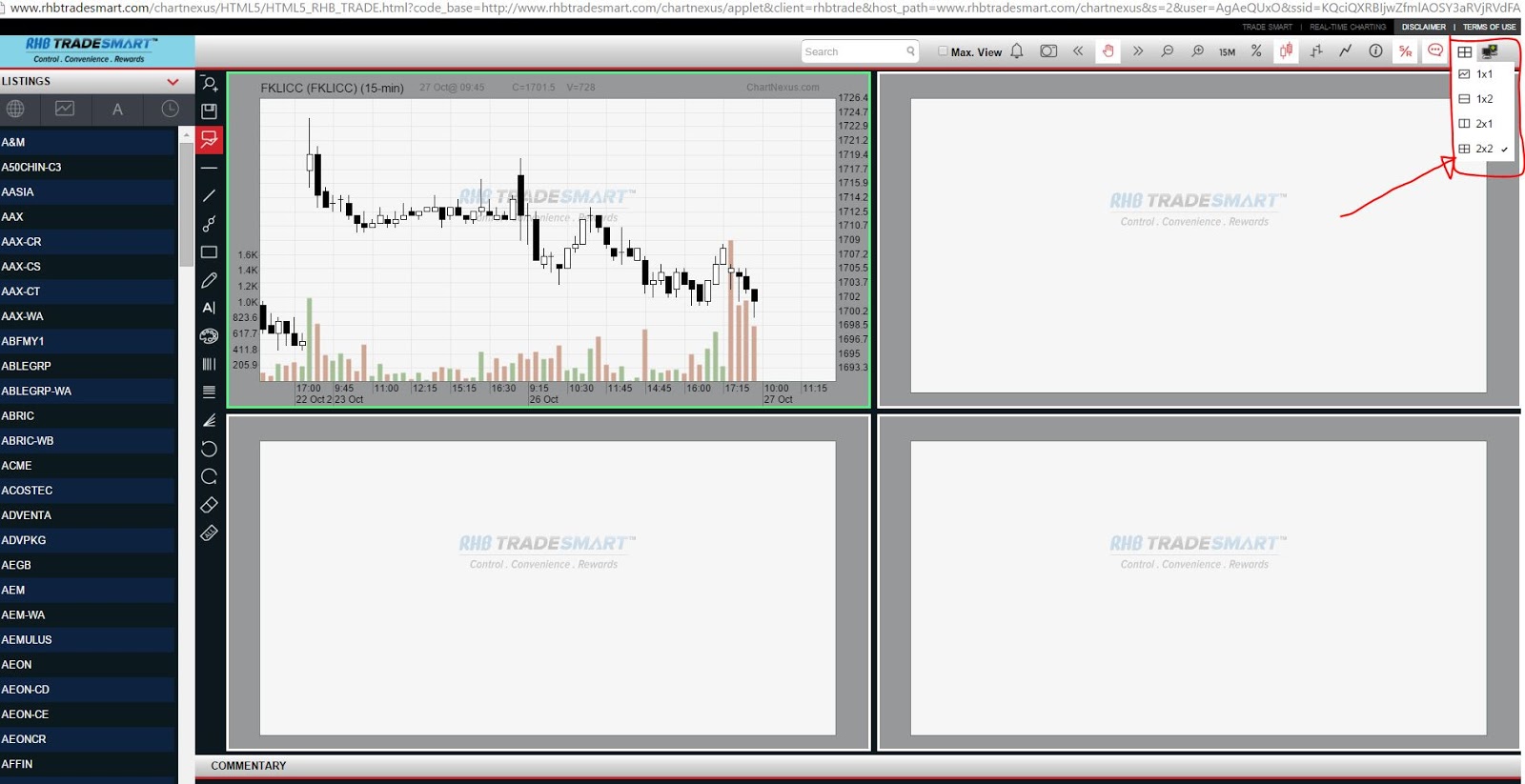
TradeSmart (web base with google chrome) - create and view 4charts
You can do this blick click on the UPPER right corner a SQUARE box and chose "2x2"
Click on below pic to enlarge it for better view
Thanks
Thursday, October 22, 2015
Trade Smart - Desktop Apps open multiple charts
Trade Smart - Desktop Apps can open multiple charts
To setup, please folow below step:
1. Click +TAB for CREATE TAB
2. Click on Widget and select TECHINICAL CHART
(example: if u want 3chars. Click 3 times on "TECHNICAL CHART)
3. Then in the box select BME > STOCK and put STOCK (stock code or name)
Click on chart below to ENLARGE to see the pic.
To setup, please folow below step:
1. Click +TAB for CREATE TAB
2. Click on Widget and select TECHINICAL CHART
(example: if u want 3chars. Click 3 times on "TECHNICAL CHART)
3. Then in the box select BME > STOCK and put STOCK (stock code or name)
Click on chart below to ENLARGE to see the pic.
Subscribe to:
Posts (Atom)